Browse the docs

Applying to jobs
What you agree to when you apply, and what happens when a family books you.
On this page
- Apply to a job
- The commitments you confirm
- After you apply
- Set up payments while you're here
- Recurring jobs
- When a family books you
- When you can't apply
- Remove your application
- Good to know
- Questions
- Does the family have to confirm with me before I'm booked?
- What if I apply to two jobs at the same time?
- Can I see the address before I apply?
- Why do I have to agree to the driving terms on every job?
- Related
When you apply to a job, you're telling the family you'll work it. If they pick you, you're booked on the spot, with no second step where you confirm, so only apply to jobs you're ready to work.
Apply to a job
-
Tap Apply on a job card, or open the job and tap Apply.
For a recurring job, the app first asks you to confirm the schedule (see Recurring jobs). -
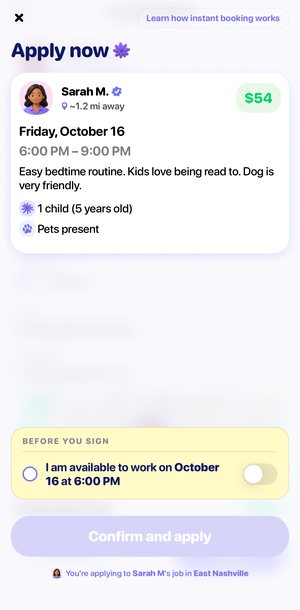
Check the job on the Apply now screen.
It shows the same card you saw in your feed: the family, your estimated payout, the date and time, and the details. Tap the family's name to see their profile. -
Turn on each commitment, one at a time.
Only the next switch is shown, and a switch can't be turned back off. Read each one before you tap it. -
Sign your name.
Choose Type and tap Tap here to sign, or choose Draw and sign with your finger. Clear starts again. Your signature is not stored. -
Tap Confirm and apply.
The line under the button names the family and the city, so you know exactly which job you're applying to.
The commitments you confirm
| Commitment | What it means |
|---|---|
| I am available to work on {date} at {time} | You're free for the whole job, at the times listed. |
| I have reviewed and am willing to work with {family} | You've read the job and the family's details. |
| I can regularly work on {days} | Recurring jobs only. You can keep working on those days if it's a good fit. |
| If confirmed by the parent, I agree to work this job | If the family books you, the job is yours. |
| If this booking includes driving, I have a valid license and auto insurance and agree to the Driving Terms | Applies to every job, in case driving is part of it. Tap Driving Terms to read them. |
Tap Learn how instant booking works at the top of the screen for a reminder: when you apply and sign, the family can book you right away, and your application is the commitment.
After you apply
The screen turns into You're committed, with what happens next:
- The parent reviews your application.
- If you're picked, the job is yours immediately. There is no second confirmation.
- If you're picked, you're expected to work the job on that date and time. Not showing up affects your account.
Tap Continue to go back to your jobs. The job moves from your Jobs list to Applied.
At the same moment, the family gets a notification that you applied, with a link to your profile so they can book you.
Set up payments while you're here
If you haven't set up your payout account yet, Continue opens Get paid faster. Tap Set up payments to add your payout details now, so payments are ready when you finish a job. Tap Skip for now to do it later from Me, then Earnings.
Recurring jobs
A job marked Recurring care opportunity is one job, with the chance of ongoing care on the days shown if it's a good fit. The first job works as a trial.
-
Tap Apply.
A Confirm application window asks: "Are you available for the trial date and the recurring schedule below?" -
Check the START DATE and RECURRING SCHEDULE.
The start date is the trial job. The schedule lists the days the family needs care going forward. -
Tap Continue, or Go back.
Continue takes you to Apply now, which adds the commitment "I can regularly work on" those days.
If the family picks you, you're notified in the app. If the trial goes well, you keep working together.
When a family books you
You get a "You're booked" notification with the family's name, the date and the start time. Tap it to open the booking.
- The job moves to your Bookings tab, under Active, and the tab shows a dot until you open it.
- You can now see the full address, parking instructions and meeting spot.
- You can message the family in the app. See Working a job.
When you can't apply
If something stops your application, the app shows the reason above Confirm and apply instead of sending it.
| Message | Why |
|---|---|
| You can't apply to this job because you're already booked during this time. | You have a booking that overlaps this job. |
| This job is no longer available. Go to the job board to find a new job. | The job has been filled, cancelled or closed to new applicants. |
| You can't apply to jobs until {date} due to recent late cancellations. | You're in a one-week pause after a second late cancellation. |
| Your account is not active. Please contact support. | Your account isn't approved yet, or it's suspended. |
Remove your application
Changed your mind before a family books you? Open the job from Applied, tap Remove application, then Yes, remove. The app confirms "Application removed".
Once you're booked, it's a booking, not an application. To get out of it you have to cancel, and cancelling within 24 hours of the start counts against your account. See Cancelling and reliability.
Good to know
- If you leave the Apply now screen, every switch resets. You confirm each commitment fresh for every application.
- The app won't let you apply to a job that overlaps one you're already booked for.
- An applied job shows Remove application instead of Apply, so you can't apply twice.
Questions
Does the family have to confirm with me before I'm booked?
No. If they pick you, you're booked immediately. That's why every application asks you to commit first.
What if I apply to two jobs at the same time?
You can. Once one family books you, the app won't let you apply to other jobs that overlap it.
Can I see the address before I apply?
No. Before you're booked, a job shows how far away it is and the area on a map. The full address appears once the family books you.
Why do I have to agree to the driving terms on every job?
Some jobs include driving. The commitment covers you only if the booking includes driving.
Related
Still stuck? Open the Wyndy app and go to Me, then Help, or contact the Wyndy team.