Browse the docs

Rates and Smart Rate
How to set an hourly rate, what Smart Rate suggests, and how the rate affects who applies.
On this page
Every job has an hourly rate, which you set on the Hourly Rate step when you post. You can take the Smart Rate the app suggests or type your own, anywhere from $16 to $150 an hour.
Set the rate
-
Reach the Hourly Rate step while posting a job.
It comes after the address. See Posting a job for the steps before it. -
Keep Smart Rate, or tap Custom.
The screen opens on Smart Rate, with the suggested rate in large type and "per hour" under it. Tap Custom, or tap the number itself, and the number pad opens so you can type your own whole-dollar rate. -
Read the line under the number.
It tells you how your rate compares with what sitters nearby charge. The wording is in the table below. -
Tap Continue.
The rate is saved to your job. You can change it on the Job Summary before you post: tap HOURLY RATE, change it, then tap Save.
Switching between Smart Rate and Custom doesn't lose your number. The app remembers the last custom rate you typed, so you can compare the two.
What Smart Rate is
Smart Rate suggests a rate from what families nearby pay for similar jobs. It's a starting point, not a requirement: sitters see the job either way, and you can always set your own.
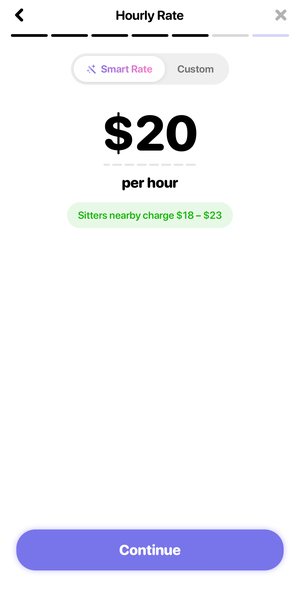
What the line under the rate means
| You see | When |
|---|---|
| Sitters nearby charge, followed by a price range | You're on Smart Rate, or your custom rate matches it. The range is what sitters near this address charge. |
| Above Smart Rate, tends to draw more sitters | Your custom rate is higher than the suggestion. Shown in green. |
| Below Smart Rate, fewer sitters may apply | Your custom rate is lower than the suggestion. Shown in amber, since a lower rate is allowed but may get fewer applicants. |
| Rate minimum is $16 | You typed less than the lowest rate a job can be posted at. Shown in red, and you can't continue until you raise it. |
| Rate maximum is $150 | You typed more than the highest rate allowed. Shown in red until you lower it. |
How the rate affects who applies
Sitters see your rate before they apply, so it's one of the first things they weigh. A rate at or above what sitters nearby charge tends to bring more applicants. A lower rate is fine to post, but expect fewer sitters to apply, especially on short notice.
If a job isn't getting applicants, its page shows how many sitters have opened it so far. Sitters opening it but not applying is a sign to look again at the rate or the time. See Applicants and booking.
What you pay
The rate is per hour, for the hours your sitter actually works. On top of it, the app adds a processing fee and, without a membership, a service fee. Any tip you add after the job goes 100% to your sitter.
| Fee | Without a membership | With a membership |
|---|---|---|
| Service Fee | 20% of the job, never more than $20 | None |
| Processing Fee | 3.5% | 2.9% |
Worked examples
A 4-hour job at $20 an hour is $80 of pay. Without a membership, the Est. Total is $99.36: $16 of service fee and $3.36 of processing. With a membership, it's $82.32.
The service fee cap matters on longer jobs. A 5-hour job at $25 an hour is $125 of pay. 20% of that would be $25, so the cap applies and the service fee is $20.
Want to try your own numbers? The babysitter pay calculator shows typical rates, and Pricing compares the membership with paying per job.
What sitters see
- Your job shows in their feed with its pay, date, time, tasks and kids.
- The job alert they get names you and says the hourly pay and the date.
- Sitters pay Wyndy a platform fee from their earnings, so the pay a sitter sees can be lower than the rate you set.
Good to know
- Whole dollars only. The rate field takes up to 3 digits and no cents.
- Changing the address can change the suggestion. Smart Rate is for the job's address, so a job at a different address can get a different suggestion.
- An old rate on a draft. If you reopen a draft whose rate no longer matches today's suggestion, it opens on Custom with your old number. Tap Smart Rate to switch to the new suggestion.
- The rate doesn't change after the job. What you pay changes with the hours worked and your tip, never the hourly rate. You can edit the hours when you pay; see Paying and tipping.
Questions
Do I have to use Smart Rate?
No. Tap Custom and type any whole-dollar rate from $16 to $150.
Why can't I continue?
Your rate is outside the limits. The red line under the number says whether it's too low or too high.
Does the service fee go to the sitter?
No. The service fee supports sitter verification, background checks and Wyndy support. Tips go 100% to your sitter.
Is the rate per child?
No. It's one hourly rate for the whole job, however many kids are on it.
Related
Still stuck? Open the Wyndy app and go to Me, then Help, or contact the Wyndy team.